SPF, DKIM, and DMARC Explained: How They Improve Email Deliverability
Sending emails might seem simple, but there is a lot happening behind the scenes to make sure your messages actually reach the recipient's inbox. Without the right setup, even legitimate emails can end up in spam or get rejected completely.
At Absolute-Email, we make sure SPF, DKIM, and DMARC are set up correctly so your emails are delivered reliably, protected from spoofing, and trusted by email providers.

Updated: 13 March 2026
Quick Answer
SPF, DKIM, and DMARC are ways to prove your emails are really from your domain. At Absolute-Email, we use these tools to help receiving mail servers verify messages, protect domains, and improve inbox delivery.
- SPF verifies the sending server.
- DKIM verifies message integrity.
- DMARC defines how authentication failures should be handled.
What Are SPF, DKIM and DMARC?
These three tools work together like layers of security for your emails:
- SPF confirms your email came from an approved server.
- DKIM confirms the message itself has not been changed.
- DMARC sets the rules for messages that fail SPF or DKIM checks.
Almost all email providers, like Gmail, Outlook and Yahoo, check SPF, DKIM, and DMARC to validate incoming messages. Using all three together ensures your emails pass these checks and increases the chances they reach the inbox instead of spam.
Key Email Authentication Terms
- SPF – Sender Policy Framework
- DKIM – DomainKeys Identified Mail
- DMARC – Domain-based Message Authentication, Reporting and Conformance
What Is SPF?
SPF lets domain owners specify which mail servers are permitted to send email on their behalf.
It works by publishing an SPF record in the domain's DNS settings. Receiving servers check this record to confirm if the sending server is authorised. Messages from unauthorised servers will likely be filtered as spam.
What Is DKIM?
DKIM adds a digital signature to your outgoing emails. This signature acts like a seal that proves the message has not been changed and really came from your domain.
Receiving servers verify this signature using a public key published in your domain's DNS settings to ensure the message is genuine.
What Is DMARC?
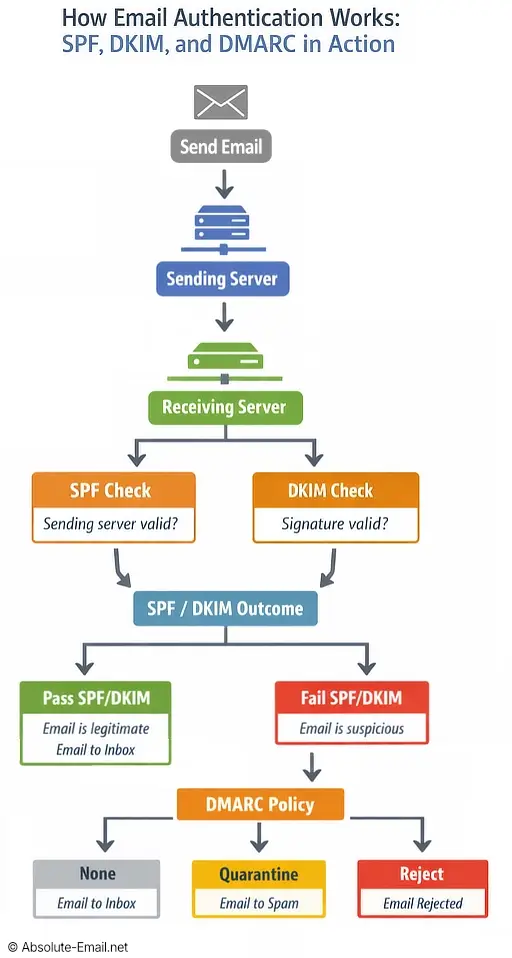
Based on the results of SPF and DKIM verification, DMARC instructs receiving servers how to handle emails that fail those checks.

DMARC confirms the sender's identity using SPF and DKIM and tells the recipient's email service what to do with emails that fail the check
It works by publishing a DMARC record in the domain's DNS settings, to set a policy:
- None – just monitor results without taking action (usually for testing only)
- Quarantine – send emails that fail checks to the spam folder
- Reject – block emails completely that fail authentication (strongest security)
DMARC empowers email senders to prevent spoofing (fake emails pretending to be from their domain) by instructing receiving servers to quarantine or reject messages that fail SPF and DKIM verification.
The NCSC recommends applying DMARC gradually, beginning with a policy of 'none' to monitor email sources before enforcing stricter actions.
DMARC also lets you receive reports, so you can spot setup problems or abuse attempts. DMARC is highly effective for preventing spoofing and protecting a sender's domain reputation.
How SPF, DKIM and DMARC Work Together
Each protocol performs a different role, and together they form a layered verification system:
| Protocol | Purpose |
|---|---|
| SPF | Verifies the sending server |
| DKIM | Verifies message integrity |
| DMARC | Defines authentication policy |
How SPF, DKIM and DMARC Prevent Email Spoofing
Email spoofing is when attackers send messages that appear to come from a trusted domain, often for phishing purposes.
Find out more: What is email spoofing and what is phishing? A simple guide.
SPF, DKIM, and DMARC stop spoofing by allowing servers to verify sender authenticity. Emails that fail checks can be quarantined or rejected based on DMARC policy.
How to Set Up SPF, DKIM and DMARC
At Absolute-Email, we automatically set up SPF, DKIM, and DMARC for every account, so your email is fully configured and works reliably from day 1.
But if you're using a provider that doesn't set things up for you, follow these steps:
Step 1: Create an SPF Record
Add an SPF TXT record to your domain's DNS listing authorised sending servers, e.g.
v=spf1 a mx ip4:123.123.123.123 ~all
Step 2: Enable DKIM Signing
Generate a DKIM key pair, publish the public key in DNS, and configure your mail server to sign outgoing messages.
Step 3: Configure a DMARC Policy
Add a DMARC TXT record to your domain's DNS defining how authentication failures should be handled, e.g.
v=DMARC1; p=quarantine; rua=mailto:dmarc-reports@yourdomain.com
Check your setup with tools like MXToolbox or Mail Tester. Regular testing helps prevent delivery issues after DNS changes.
Frequently Asked Questions
Are SPF, DKIM, and DMARC all necessary for email authentication?
Yes. Using all three ensures emails are from authorised servers, the message is verified, and failures are handled correctly. Without them, emails are more likely to go to spam or be rejected.
Does SPF improve email deliverability?
Yes. SPF verifies sending servers, which builds trust with receiving systems and improves delivery.
Can I use SPF and DKIM without DMARC?
Yes, but DMARC adds extra protection and reporting, which is highly recommended.
What happens if an email fails DMARC?
The email provider follows the rules in your DMARC record: deliver to spam, reject, or log the failure. Providers will still filter emails based on other factors like their own spam detection too.
What is email spoofing?
Email spoofing is the practice of falsifying the sender address in an email to make it appear as though the message originates from a trusted source, commonly used in phishing attacks, scams, and other malicious campaigns to mislead recipients and evade security mechanisms.
Summary
SPF, DKIM and DMARC are your email's security team: SPF checks who is sending the email, DKIM makes sure the message has not been changed, and DMARC decides what to do if something looks suspicious.
Absolute-Email recommends using all three together to improve inbox delivery, stay out of spam, and protect your domain from scammers.